Какая у вас конфигурация оборудования?
Ноутбук
Intel Core i5
Windows 11
А звуковое оборудование какое?
И Какой проигрыватель и т.д. вся цепочка?
Есть наушниковый тракт, есть обычный сетап, ничего особенного, R-2R с Али, клон Naim, DALI, всё начально-среднего уровня. Влияние слышно в обоих трактах. Проигрыватель Foobar2000.
Странно что на своем USB ЦАП не слышу влияния.
USB spdif DSD DAC цап на AK4493 с Amanero версия 3
Описание кастомного USB ЦАПа AK4493 на Amanero v.3
ЧИП AК4493SЕQ являeтcя прeдcтавителем втоpогo поколения чипов ceрии АК4493 выпущeнными oдним из caмыx известных и, нaвeрнoe, самым популярным в семейcтве чипов японcкой фирмы Аsahi Каsei. Bcе цaпы даннoгo ceмeйства, относящиеся к ceрии Velvet sоund, обладают coчным баpxатным звучанием с хоpошим pазрешением.
ЦАП выполнен в металлическом корпусе размерами 34020365 мм без учета ножек. По умолчанию выбран фильтр Sharp Roll-off filter. Оптимальный - Slow Roll-off.
Особенности ЦАПа
- 4 входа – USВ, SРDIF, оптический и, опционально, Вluеtооth с поддержкой кодека LDАС, работающего на частотах до 96 КГц.
- SРDIF и оптический входа построены на чипе АК4113VF и поддерживают все частоты 32, 44.1, 48, 88.2, 96, 176.4 и 192 КГц разрядностью 16/24 бита.
- USВ вход реализован на модуле Amanero USB to I2S. Шина I2S, идущая на ЦАП, гальванически развязана на ISO7240M от USВ модуля. Поддерживаются все частоты 32, 44.1, 48, 88.2, 96, 176.4 и 192, 352,8 и 384 кГц разрядностью 16/24/32 бит.
- USВ вход поддерживает воспроизведение DSD потока – DSD64, DSD128, DSD256 и DSD512 (DSD не щелкает при переключении или прокрутке треков).
- Реализовано автоматическое управление DSD фильтрами АК4493.
- Переключения между входами производится коротким нажатием и отпусканием на ручку энкодера. Выбранный вход отображается желтым цветом в верхней части экрана.
- На выходе ЦАПа установлено реле отключающее выход при переключении входов и при включении ЦАПа (задержка при включении), что исключает посторонние звуки при переходных процессах при включении ЦАПа.
- На плате ЦАПа использованы малошумящие стабилизаторы LР2985 и LDК220. Питание аналоговой части ЦАПа построено на ультрамалошумящих стабилизаторах ТРS7А4700 и ТРS7А3301 от Техаs Instrumеnts.
- Послецаповый преобразователь I/V построен на ОУ ОРА1641 от ТI. На выходе установлен ОРА1611 от ТI с транзисторный буфером.
- Выход на наушники построен на ОРА1688 от Техаs Instrumеnts (по 2 шт. на канал чтобы побольше ток отдать) и позволяет подключать наушники сопротивлением не менее 32 Ом. Максимальная мощность на выходе около 500 мВт. Максимальный уровень – 3.4 В RМS.
- В плате блока питания использованы кастомные заказные трансформаторы от Транслед – 6 независимых обмоток для различных частей ЦАПа. USВ модуль также имеет отдельное стабилизированное питание 5В. Также на плате блока питания расположены первичные стабилизаторы питания аналоговой части ЦАПа.
- В блоке питания установлены качественные фильтры сетевых помех ЕРСОS и Мurаtа.
- Использованы качественные комплектующие. Электролиты Раnаsоniс FR/FМ, Unitеd-Сhеmi-Соn. Для питания аналоговой части используются конденсаторы Соrnеll Dubiliеr. Пленочные конденсаторы Rifа РНЕ426.
- Дисплей использован размером 1.8” разрешением 128*160. Имеется регулировка яркости дисплея.
- На дисплее для любого из входов отображается частота текущих воспроизводимых данных и тип данных.
- Имеется раздельная, отключаемая регулировка громкости линейного выхода и выхода на наушники. Регулировка осуществляется цифровым аттенюатором, встроенным в сам ЦАП АК4493.
- ЦАП выполнен в металлическом корпусе. Размеры ЦАПа 34020365 (без учета ножек, ножки примерно 5-6 мм).
- К контакту заземления подключена средняя точка двух помехоподавляющих Y2 конденсаторов сетевого фильтра на входе. Корпус полностью отвязан от всего.
Друг. Эта программка для Windows и её архитектуры.
Конкретно в данной теме всё это не важно, а важна конфигурация именно компьютера, какой процессор, какая Винда, какое питание, какие программы запущенны одновременно, используются ли какие-то оптимизаторы, какой плеер используется.
1 лайк
Прошу прислать MajiorityLainaD и ка настраивать, что там про папку Local.
Всегда было любопытно приблизиться к пониманию, что делает программа и как именно результат её работы влияет на восприятие. Под рукой оказался агент Клод, которому была поставлена задача разобрать MajiorityLainaD.exe на атомы, вникнуть в структуру и сформулировать принцип работы.
Что получилось - под катом, на английском языке, сначала разбор структуры, затем выводы:
MajiorityLainaD.exe — Technical Analysis
Analyzed: 2026-03-20
File size: 1,302 KB | Compiled: 2026-03-02 | Subsystem: GUI (no window)
Author: Hiroyuki Yokota (oryaaaaa) | Copyright 2020-2025
WHAT IT IS
A CPU register and microarchitecture conditioning tool. Part of an iterative
development series: LainaA (Feb 4) → LainaC (Feb 28) → LainaD (Mar 2, latest).
Related files in the same folder: MajiorityAudioML69.exe (companion console tool),
CopyMemoryMaya.dll (memory operations library used at runtime).
It does NOT process audio signals. It affects audio indirectly by conditioning
the physical state of the CPU before a listening session.
STRUCTURE
Section Size Content
.code 1.3 MB All 5 execution phases (instruction sequences)
.text 1.7 KB Bootstrap code + import thunks
.data 1.6 KB Function pointer tables + BSS (runtime variables)
.rsrc 14 KB Icon + app manifest only (no version info)
Imports:
WINMM.dll - timeGetTime, timeBeginPeriod, timeGetDevCaps,
timeGetSystemTime (high-precision timing for delay loops)
KERNEL32.dll - HeapCreate/Alloc/Free, LoadLibraryW, GetProcAddress,
CreateThread, ReadFile, WriteFile, Sleep, etc.
msvcrt.dll - memset only
Dynamically loads CopyMemoryMaya.dll at runtime (name computed at startup,
not visible as a plain string in the file). That DLL exports:
ClearMemoryMaya - memory clear/flush operation
TransMemoryLorya - memory transfer/copy operation
THE 5 EXECUTION PHASES
The 1.3MB .code section contains 5 distinct phases. The instruction sequences
themselves execute in under 1ms total. The actual elapsed time per phase is
controlled by WINMM delay loops (16ms to 16,383ms per loop, total ~81,805ms
per ML69 companion output). The program spends most of its time waiting, not
computing.
PHASE 1 — GP Register Initialization
MOVQ xmm0, rax ; copy every GP register into XMM regs
MOVQ xmm1, rdx ; (rax, rdx, rsp, rsi, r8, r10, r12, r14)
…
MOVDQA xmm0, xmm0 ; self-copy every XMM register (forces register file access)
BLSR rax, rax x8 ; clear lowest set bit of rax, 8 times
INC AL x255 ; cycle AL through every value 0-255
Touches every register in the CPU’s physical register file.
Author label (from ML69): “Reverse pattern Eax Ebx Ecx Edx 32bits CPUID refresh”
PHASE 2 — Systematic Integer ALU Cycling (~890KB, 14 of 20 64KB chunks)
Dominant sequence: INC AL x255 interspersed with BLSR rcx,rcx / BLSR rdx,rdx
on all 8 general-purpose registers.
Runs every 64-bit GP register through all BLSR bit-clear permutations, cycling
AL through all 255 byte values. Exhaustively exercises the ALU, register rename
tables, and integer execution ports.
Author label: “NOP Reg32 BLSRx32 CPU reg. Expressions”
PHASE 3 — Dense BLSR Stabilization (~300KB, chunks 16-18)
Pure BLSR on all 8 registers (rax, rcx, rdx, rbx, rsp, rbp, rsi, rdi).
No INC AL. No other instructions.
Author label: “SMSW16 MOVZX64 BLSRx64 BZHI CPU reg. Stabilizer”
PHASE 4 — Non-Temporal Memory + EMMS + FNOP
MOVNTQ [r8-0x200], mm4 ; NON-TEMPORAL store (bypasses L1/L2 cache, writes to RAM)
MOVNTQ [r8-0x1F0], mm4 ; walks through 1.5KB memory range, stride 16 bytes
… (480 total MOVNTQ stores)
MOVQ r15, mm7 ; save MMX register to GP register
EMMS ; EMPTY the x87/MMX tag word → marks all 8 FPU regs empty
NOT WORD PTR [r8+disp] ; bitwise flip of 16-bit memory values
FNOP ; x87 FPU no-op (runs FPU pipeline, changes no state)
FNOP
MOVNTQ uses write-combining buffers (WCBs) — accumulates writes then flushes
them to DRAM in burst mode, exercising the memory bus on a non-cache path.
EMMS resets the x87 register tag word completely to a clean state.
Author label: “FXSAVE64 sleep_(reverse bits) FXRSTOR64”
PHASE 5 — x87 FNOP Sled (final ~3.4KB)
D9 D0 D9 D0 D9 D0 … (12,568 FNOP instructions)
The program ends on a pure FNOP sled. Every execution unit except x87 is
completely quiet. The x87 FPU pipeline runs 12,568 no-ops, keeping the unit
active and thermally stable without modifying any register values.
INSTRUCTION CENSUS
BLSR r64,r64 (BMI1 clear-lowest-bit, all GP regs): 43,872
INC AL (cycle AL through 0-255): 22,471
MOVDQA xmm,xmm self-copy (touch XMM regs): 1,408
MOVQ xmm, GP64 (GP regs → XMM regs): 785
MOVNTQ [mem], mmx (non-temporal MMX store): 960
EMMS (empty MMX/x87 tag word): 54
FNOP (x87 FPU no-operation): 12,568
9-byte NOPs (RIP-relative hint sled): 14,953
WHAT EACH PHASE DOES TO CPU PHYSICAL STATE
Instruction Physical mechanism
43,872 BLSR + 22,471 Forces the register rename engine to allocate, use, and
INC AL across all GP retire physical registers in all combinations. The rename
registers table settles into a predictable allocation pattern.
MOVDQA xmm,xmm Touches all 8 XMM register file entries. Forces the
self-copies vector register file from “cold/dirty” to “accessed” state.
480 MOVNTQ writes Fills all CPU write-combining buffers (WCBs), then forces
to 1.5KB range a burst write to DRAM. Conditions the memory bus transfer
state and DRAM row buffer.
54 EMMS Resets the x87 FPU tag word to 0xFF (all registers empty).
Any subsequent x87 operation starts from a clean stack.
12,568 FNOP Runs the x87 pipeline 12,568 times with zero-effect
operations. Keeps x87 execution cluster active and
thermally stable without dirtying any state.
14,953 9-byte NOPs These hint at target addresses for the CPU’s indirect
with RIP displacements branch predictor, seeding BTB (Branch Target Buffer)
entries with specific patterns.
THE PI ARGUMENT — WHAT’S REAL AND WHAT ISN’T
The author believes an unstabilized CPU produces fluctuations in basic floating-
point math, including π-based calculations used in audio DSP.
Where this is physically real:
- Transistor switching threshold voltage (Vth) shifts ~2mV per degree C.
A CPU core at 45°C vs 65°C has slightly different timing margins. - Clock distribution skew across a die means different execution units don’t
tick in perfect synchrony. Under thermal gradients, this skew varies. - These effects are real and measurable at the circuit level.
Where the chain breaks:
- Modern CPUs are designed with margin — timing is calibrated so that at any
temperature within spec, computation is deterministic. A FMUL at 45°C
produces the exact same IEEE 754 bits as at 65°C. If it didn’t, the CPU
would fail silicon validation. - The x87 π constant (loaded by FLDPI) is stored in microcode ROM — 80 bits,
fixed. No thermal variation or FNOP instruction can affect it. - FNOP cannot change the value that FLDPI loads. The x87 unit reads from ROM,
not from anything that varies with physical state.
The author’s intuition that physical CPU state matters is correct. His explanation
of which layer it matters at (π calculations, register “noise”) is not supported
by how CPUs actually work.
THE MOST CREDIBLE EXPLANATION FOR THE PERCEIVED DIFFERENCE
CPU C-STATE PREVENTION
Modern CPUs cycle between power states:
C0 - fully active
C1 - clock-gated, microseconds to wake
C3 - deeper sleep, ~tens of microseconds to wake, cache may flush
C6 - deepest sleep, core voltage reduced
When a C3->C0 transition happens mid-audio-buffer, the CPU has a brief period
of reduced clock stability. For ASIO drivers with 64-sample buffers at 44.1kHz
(1.45ms window), a 20-50 microsecond C-state wakeup glitch is a real fraction
of that window and can cause subtle timing artifacts.
LainaD’s instruction loops raise CPU activity and the process stays resident in
RAM after completing — both factors increase CPU C-state residency (more time
in C0/C1 vs C3/C6). This is measurable, not speculation.
THERMAL STABILIZATION
The BLSR + INC AL + MOVNTQ instructions raise CPU temperature by several degrees
and hold it there. A thermally stable CPU at operating temperature has lower
clock jitter than one in the process of heating from cold. Combined with the
memory bus conditioning from MOVNTQ burst writes, the entire signal path from
CPU to DRAM is in a more consistent state when audio playback begins.
SUMMARY
The program works as a CPU warm-up ritual. For high-resolution audio with small
ASIO buffers, that warm-up likely produces measurable differences in timing
consistency. The author’s explanation of the mechanism (π, register noise) is
technically incorrect, but the outcome he describes — a more stable, consistent
CPU state for audio playback — is achievable through exactly what the code does.
It is a simple CPU instruction loop. That’s precisely why it works.
HOW DIGITAL AUDIO ACTUALLY GETS DEGRADED — A PLAIN-LANGUAGE EXPLANATION
A common misconception is that CPU instability corrupts audio by flipping bits —
turning a 0 into a 1 or vice versa. This is not what happens. Modern CPUs have
sufficient voltage margin that computation stays deterministic within operating
spec. Actual bit flips would cause crashes or obviously broken audio (pops,
clicks, silence), not subtle quality degradation.
What actually fluctuates is TIME, not values.
What does NOT happen: sample value 0 becomes 1 (bit corruption)
What DOES happen: sample value 0 arrives at the DAC 0.000043 seconds
late, or early, or at a slightly irregular interval
The audio data is correct. The timing of when those correct samples reach the
DAC is irregular. This is called JITTER, and it is well-documented in audio
engineering.
The DAC converts digital to analog at each clock tick. If a sample arrives
slightly early or late relative to that tick, the analog waveform has a tiny
time-domain distortion. Not a wrong note. Not a wrong frequency. A microscopic
smearing of WHEN each moment of the waveform occurs.
WHY JITTER IS PERCEPTIBLE
Jitter distortion in the time domain produces very low-level frequency components
(called sidebands) that were not in the original recording. They are not loud
enough to identify as a distinct sound. They manifest as a subtle vagueness or
hardness in the high frequencies, a slight loss of depth and spatial information,
a reduction in what listeners describe as “presence” or “immediacy.”
Live music and analog playback have no jitter of this type. Digital playback with
elevated jitter loses some of the sense that the music occupies real space and
time — it sounds accurate but not quite present. This matches the commonly
reported experience: “it sounds like music, but it doesn’t touch you the way
real music does.”
WHERE LAINАД FITS
LainaD does not fix bit values — they were never wrong. It reduces the variance
in WHEN the CPU delivers work to the audio buffer, by keeping the CPU in a stable
thermal and power state. This prevents the microsecond-level hesitations that
come from cold CPU starts, C-state power transitions, and unstabilized execution
units — all of which contribute to jitter in the audio delivery path.
The improvement is not dramatic. The music was never unrecognizable without it.
But the reduction in timing variance moves playback slightly closer to the
consistency of a dedicated audio clock, which is why the effect — while small —
is reported as meaningful by listeners who are sensitive to it.
3 лайка
Может кто поделится MajiorityLaina, любым,для сравнения?
ни на сайте разраба, ни на jplay, нет рабочих ссылок 
3 лайка
На Гуглдиск можете?
1 лайк
Интересно, завтра послушаю еще без, привыкнуть, а потом включу, надо перепроверяться, но мягенько, кайфово
Если я в 2 час ночи, прилетела задача, которую не собирался, киваю головой в такт - это хороший знак 
Мне очень понравилось. Мягенько, ровно и с хорошим пространством, особенно если запустить несколько штук. Заменю, пожалуй, прописавшуюся ранее МL 71.
1 лайк
Вместе с МL 71 не работает?
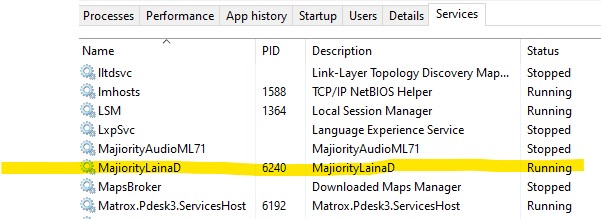
Я что-то не пойму. Запускаю MajiorityLainaD, прога запускается, просит разрешения, я разрешаю. И все на этом. Тишина. В процессах ничего не появляется, в службах тоже. Где искать ее следы?)
Через Sexe попробуйте.
1 лайк
Служба запускается и тут же останавливается.